Make Your USB Devices
Cross-Platform Ready
Professional macOS USB cleaning tool. One-click cleanup to free up space and fix cross-platform compatibility issues.
CleanMyUSB is a powerful USB cleaning tool designed specifically for macOS. It intelligently identifies and cleans system junk files on USB drives, SD cards, and other external storage devices.
 CleanMyUSB — USB Drive Junk Cleaner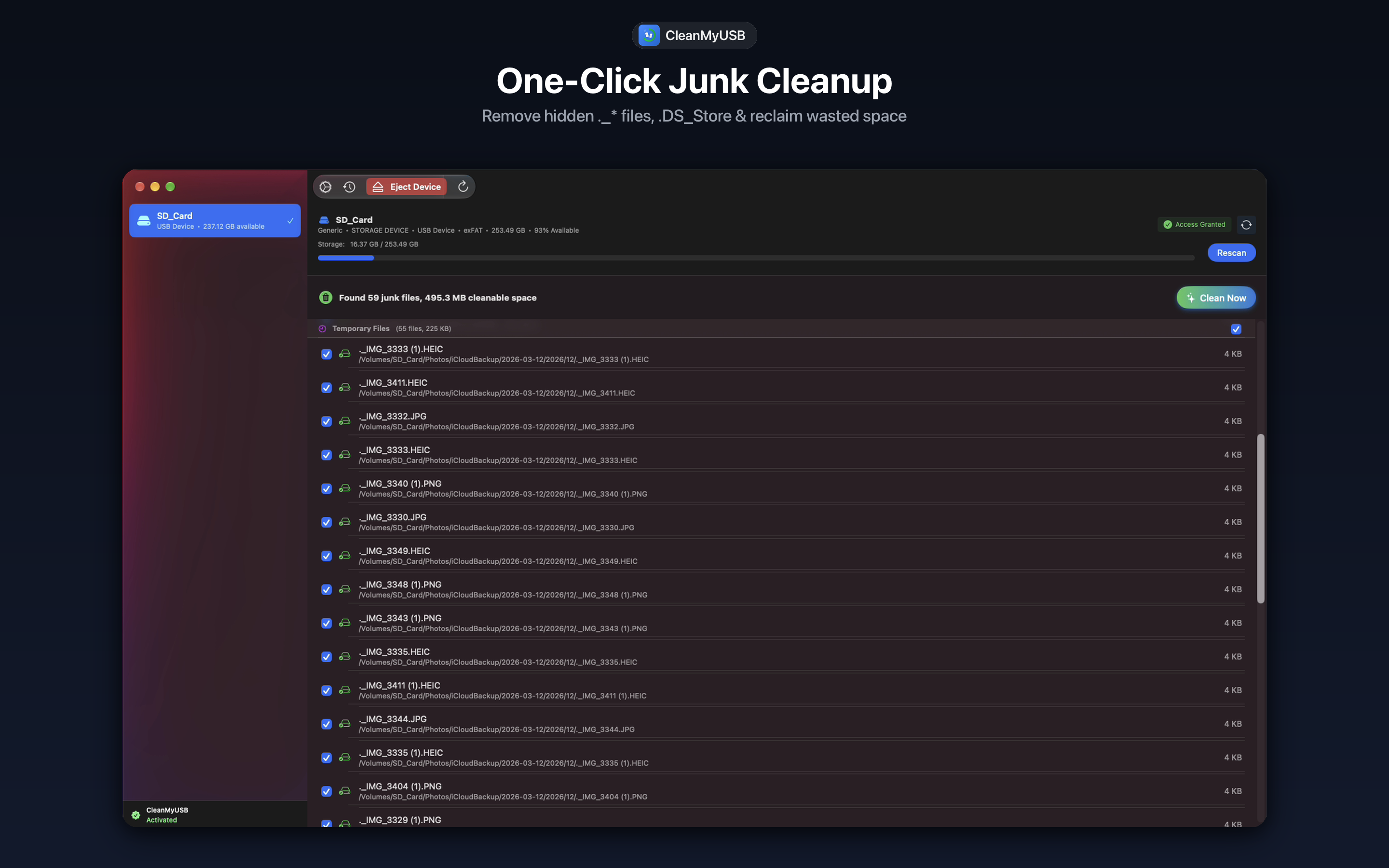
📱 App Store User Upgrade Notice
Due to App Store sandbox restrictions, the App Store version cannot clean some hidden system files. For full functionality, please download the direct distribution version and contact us for a free full-version license.
Smart Detection
Automatically identifies system junk files
Lightning Fast
One-click quick cleanup of junk files
Safe & Secure
Protects important files from deletion
See How CleanMyUSB Works
Watch this demo video to learn how to quickly clean your USB devices with CleanMyUSB
CleanMyUSBPlug-in Detection & Smart Scan
One-click scan and clean all junk files
Eliminate Ghost Junk Files
Smart recognition protects important files
Menu Bar Control & Safe Ejection
Intuitive interface, no technical knowledge required
Free download, supports macOS 13.5+
Carefully Crafted for macOS
Explore CleanMyUSB's intuitive workflow, sleek dark UI, and powerful features
One-Click Junk Cleanup
Remove hidden ._* files, .DS_Store & reclaim wasted space
CleanMyUSB scans USB drives and SD cards in milliseconds, identifying hidden macOS artifacts including ._* AppleDouble resource forks, .DS_Store folder configurations, .Trashes remnants, and Spotlight temporary caches. Select all or target specific items, then click 'Clean Now' to instantly recover hundreds of megabytes.
Powerful Features All-in-One
CleanMyUSB provides comprehensive USB cleaning solutions to keep your devices in optimal condition
Auto-detect USB devices
Automatically identifies and lists available USB drives and SD cards after insertion
- Plug-and-play device recognition
- Supports various storage device types
Clean macOS hidden files
Remove .DS_Store files, Spotlight indexes, Trash files, and more
- Clean system-generated hidden files
- Free up valuable storage space
Clean cross-platform files
Handle problem files created when sharing between Windows and Mac
- Resolve compatibility issues
- Optimize cross-system file sharing
File type selection
Allows users to customize which file types to clean
- Flexible cleaning options
- Precise control over cleaning scope
Custom exclusion rules
Supports adding a whitelist to avoid deleting specific files
- Protect important files
- Smart file recognition
Cleaning history
Detailed records of cleaning operations and results for easy tracking
- Complete operation logs
- Safe ejection
Menu Bar Support
A resident menu bar icon monitors USB devices in the background and gives quick access to scan & clean
- Background device monitoring
- Quick access to scan & clean
Folder & Network Share Cleanup
Clean junk files in local folders and Finder-mounted SMB/NAS shares with drag & drop and Finder context menu integration
- Local folders & SMB/NAS network shares
- Finder context menu service & drag-and-drop
Why Choose CleanMyUSB?
Professional USB cleaning tool providing the best device management experience
Security Certified
Safe and reliable cleaning tool to ensure your data safety
Get Started with CleanMyUSB
Download now and make your USB devices like new again
CleanMyUSB is a powerful USB cleaning tool designed for macOS. Download and experience it now!
Safe & Reliable
Safe and reliable cleaning tool
Smart Cleanup
Automatically identifies junk files
Lightning Fast
Quick and efficient cleaning experience
Requires macOS 13.5 or later
Free Download • No Registration Required
Choose Your Plan
CleanMyUSB offers simple, transparent pricing. Buy once, use forever.
CleanMyUSB Full Version
Limited time offer! One-time purchase with lifetime access to all features and updates
📱 App Store User Upgrade Notice
Due to App Store sandbox restrictions, the App Store version cannot clean some hidden system files. For full functionality, please download the direct distribution version and contact us for a free full-version license.
Frequently Asked Questions
Learn more about CleanMyUSB